New Languages, Live Previews
& Smarter Tools for June.
June was a full month. Web assignments, C# support, a redesigned profile page, and improved unit tests — all shipped in June. All of it for educators and students who want more from the platform. Here's everything that went out.
Daniela Dias
Co-founder
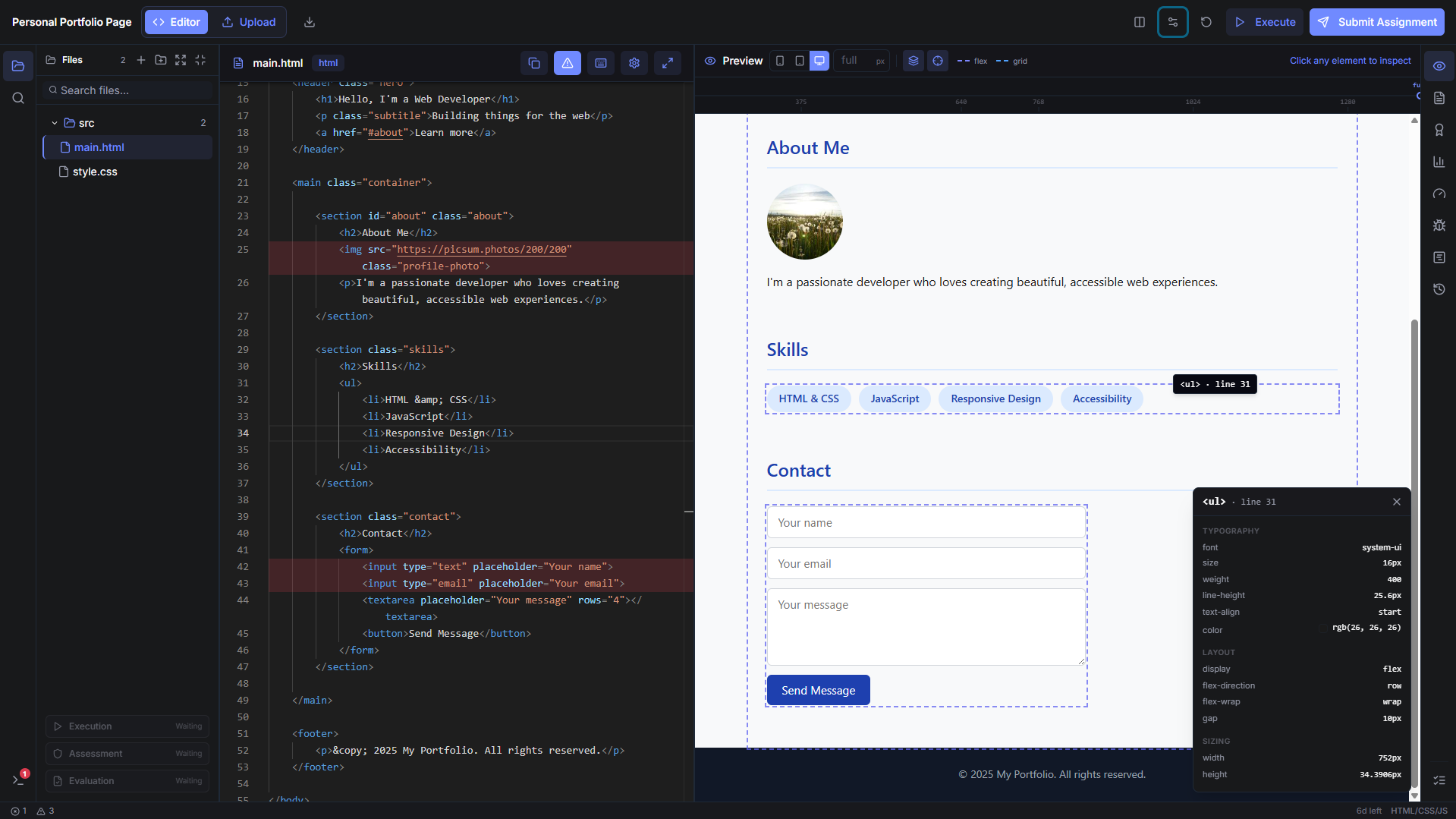
HTML, CSS, and JavaScript assignments. Now.
CodeSpell now supports web assignments. Students write HTML, CSS, and JavaScript directly in the browser workspace. The preview updates on every keystroke — and clicking any element in the preview jumps directly to the corresponding line in the editor. No local server, no build step. Write, see, fix, submit.
It opens CodeSpell to front-end courses, web development bootcamps, and intro programming with visual output. Educators get the same automated feedback depth they've seen in other languages — plus a live preview their students can actually interact with.
Welcome!
My portfolio site
- Two-way code and preview — Every keystroke updates the browser output live. Click any element in the preview and the editor jumps to its source. Write, see, fix — without leaving the workspace.
- Same quality depth as backend languages — Line-level quality and security issues. Accessibility violations, non-semantic markup, unused selectors — all flagged.
- Works for courses of any size — Create a web assignment, share it with your class, and review submissions from one dashboard.
C# support is here
CodeSpell now supports C# code execution and analysis — quality, cyclomatic complexity, and security. It opens the platform to .NET courses and any institution with a Microsoft-stack curriculum.
It works exactly the same as every other language in CodeSpell — same workspace, same per-function breakdown, same grade scale. If you've used CodeSpell for Python or Java, C# is ready to go.
- Supports .NET courses — Create assignments in C# for any course. Students submit directly in the browser workspace.
- Same analysis depth as Python and Java — Quality score, cyclomatic complexity per method, security scan, and AI explanations on every issue.
Your profile, redesigned
The profile page got a full redesign. It now shows language proficiency scores built from your real submission history — each language you've written gets a score derived from your actual code quality over time, across assignments and projects.
The page is public. Students can share it as part of a portfolio. Educators can use it to see a student's strengths at a glance, without opening individual submissions.
Ana Ferreira
Student@ana.ferreira · ana@uni.pt
47
Submissions
2
Projects
3
Courses
Language Proficiency
Courses · 3
Python
Java
- Language proficiency from real submissions — Scores are computed from your actual code quality over time, not self-reported.
- Courses and projects in one place — Every course you're enrolled in and every project you've created shows up on the same page, with submission counts and grades.
Unit tests, verified
Creating a rock-solid assignment starts with rock-solid unit tests — and now, professors don't have to wait until students start submitting to find out if something's off.
With the new Unit Test Verification tool, educators can run and validate their unit tests directly from the Editor, before an assignment is even published. If a test fails, CodeSpell doesn't just say "it didn't work" — it shows the full execution logs from the testing tool, so professors can see exactly what went wrong and how to fix it.
Your Unit Tests
Template Solution · read-only
Test Results
2 of 3 failedAssertionError: add(-2, 5) — Expected: 7 · Got: 3
Tool Output · raw execution logs
stdout
$ running test_suite.py ...
collected 3 tests
test_add_positive_numbers ... ok
test_add_negative_numbers ... FAIL
test_add_zero ... FAIL
stderr
Traceback (most recent call last):
File "test_suite.py", line 14, in test_add_negative_numbers
AssertionError: 3 != 7
It's a small step in the assignment creation process that saves a lot of time down the line, helping ensure every challenge students receive is accurate, fair, and ready to go.